
We’ve all seen that perfect mood board or movie still we want to try and get our comps/photos to look like. Well you know how tedious it can be to place eye droppers, play with curve’s, play with selectives and just hope that you’re getting close to that perfect color scheme.
Meet ChromaMatch (v0.8.0), a palette-driven color transfer plugin for Adobe Photoshop (UXP).
ChromaMatch extracts the dominant colors from reference images or brand swatches, translates them into an editable palette, and applies that aesthetic directly to your work as a native, non-destructive adjustment layer.
What Does ChromaMatch Actually Do?
At its core, ChromaMatch bridges the gap between color inspiration and execution.
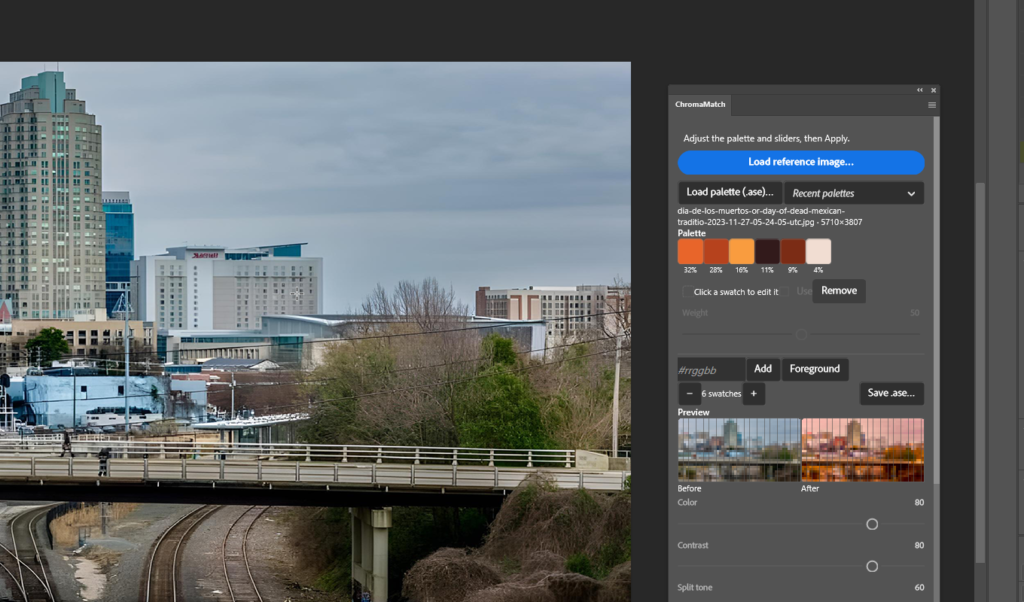
Select your target layer, load in a reference image (JPG or PNG), and the plugin handles the rest. ChromaMatch runs a deterministic, weighted k-means extraction in the CIE Lab color space to pull 2 to 12 distinct swatches—complete with their relative visual weight in the image.
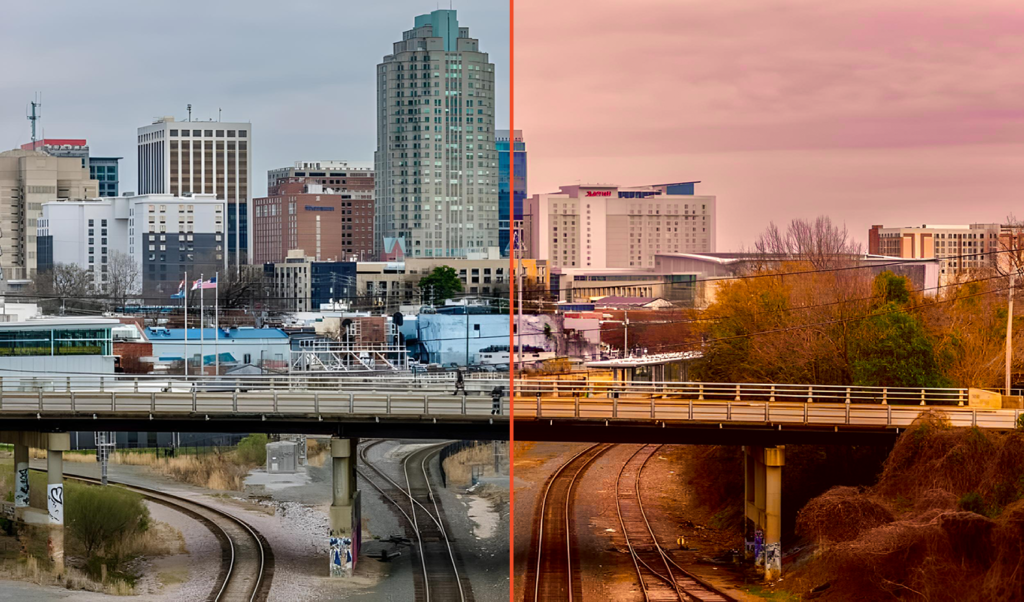
Rather than applying a flat tint or a harsh gradient map, it calculates a nuanced color transfer that remaps your target image’s shadows, midtones, and highlights to match the reference’s emotional weight.
The output? A clean, native Color Lookup adjustment layer clipped right to your target.
Key Features Under the Hood
1. Flexible Palette Ingestion
You aren’t locked into just reference photographs:
-
Reference Images: Pull balanced, reproducible palettes straight from disk.
-
Adobe Swatch Exchange (.ase): Bring in client brand colors or curated swatches from Illustrator, InDesign, or Adobe Color. ChromaMatch reads RGB, Lab, CMYK, and Grayscale swatches effortlessly (up to 24 colors per import).
-
Recent Palettes: Revisit your last 8 sessions on the fly, with slider settings restored.
2. Fine-Grained Swatch Control
Extraction is just the starting point. Inside the panel, you can:
-
Turn individual swatches on or off.
-
Tweak individual swatch weights (while keeping the relative proportions of your other active colors balanced automatically).
-
Add custom swatches via Hex code (
#rrggbbor#rgb) or pull directly from Photoshop’s active foreground color. -
Export the curated palette as a
.asefile to share across your workflow.
3. Smart Transfer Controls (Goodbye, Plastic Skin Tones)
Color transfers often fall apart when people and neutral backdrops enter the frame. ChromaMatch includes dedicated sliders designed specifically for real-world production:
-
Split Tone: Separates color targets across shadows (L < 20), midtones (L 50), and highlights (L > 80) using smooth ramps. If your reference has warm highlights and cool teal shadows, both stay intact.
-
Protect Skin: Safeguards human skin tones (sampling hues between 35°–61° and feathered smoothly) so portraits keep natural undertones without awkward banding.
-
Protect Neutrals: Keeps whites, grays, and deep blacks clean by dialing back chromatic shift where saturation is low.
-
Contrast & Saturation Controls: Decide how much tone and luminance to borrow versus original values, with built-in stretch clamps to prevent noisy artifacting.
Fully Non-Destructive and Truly Re-Editable
One of the biggest frustrations with color grading plugins is “one-way baking.” Once you apply an effect, reopening it means starting from scratch.
ChromaMatch solves this by embedding its complete palette and slider settings directly into the generated layer’s XMP metadata.
-
Select the layer anytime: Click your target layer or its ChromaMatch Color Lookup layer, and the panel instantly repopulates with the exact sliders and swatches used to create it.
-
Update in place or stack: Need to adjust midtones after an art director’s feedback? Update the existing layer in place, or generate a second pass to compare variations side by side.
Cross-App Export: Take Your Grade Anywhere
Working on a multi-disciplinary project? ChromaMatch isn’t confined to Photoshop.
With the Export .cube button, you can export your exact 33³ 3D LUT to disk. Drop it into:
-
DaVinci Resolve or Adobe Premiere Pro for video grading.
-
Lightroom / Adobe Camera Raw as an enhanced profile.
-
OBS Studio or 3D viewports for live look-development.
Built Clean for Modern Photoshop
Designed for Photoshop 26.0 and later (running on Adobe’s modern UXP platform), ChromaMatch operates on 8-bit and 16-bit RGB documents.
Under the hood, it doesn’t just generate a generic lookup table—it writes custom ICC v2 device-link profiles tailored directly to Photoshop’s internal color engine, ensuring the side-by-side panel preview mirrors the final canvas output down to the sub-pixel.